Product UI Teardown
2026. 05. 19. 23:55:26@NeoDrop Official
Notion's Connections tab: the trust dashboard hiding in plain settings
A teardown of Notion's redesigned Connections tab — shipped May 13 2026 with the Developer Platform release — showing how consolidating three separate authorization surfaces into one unified card-row list encodes a specific design claim: that agent trust should be managed with the same visual language as tool trust. Extracts the "Trust Dashboard" pattern: a single, role-accessible surface organizing all authorization-bearing connections by entity identity, with a 10-second usability test any PM can apply immediately.
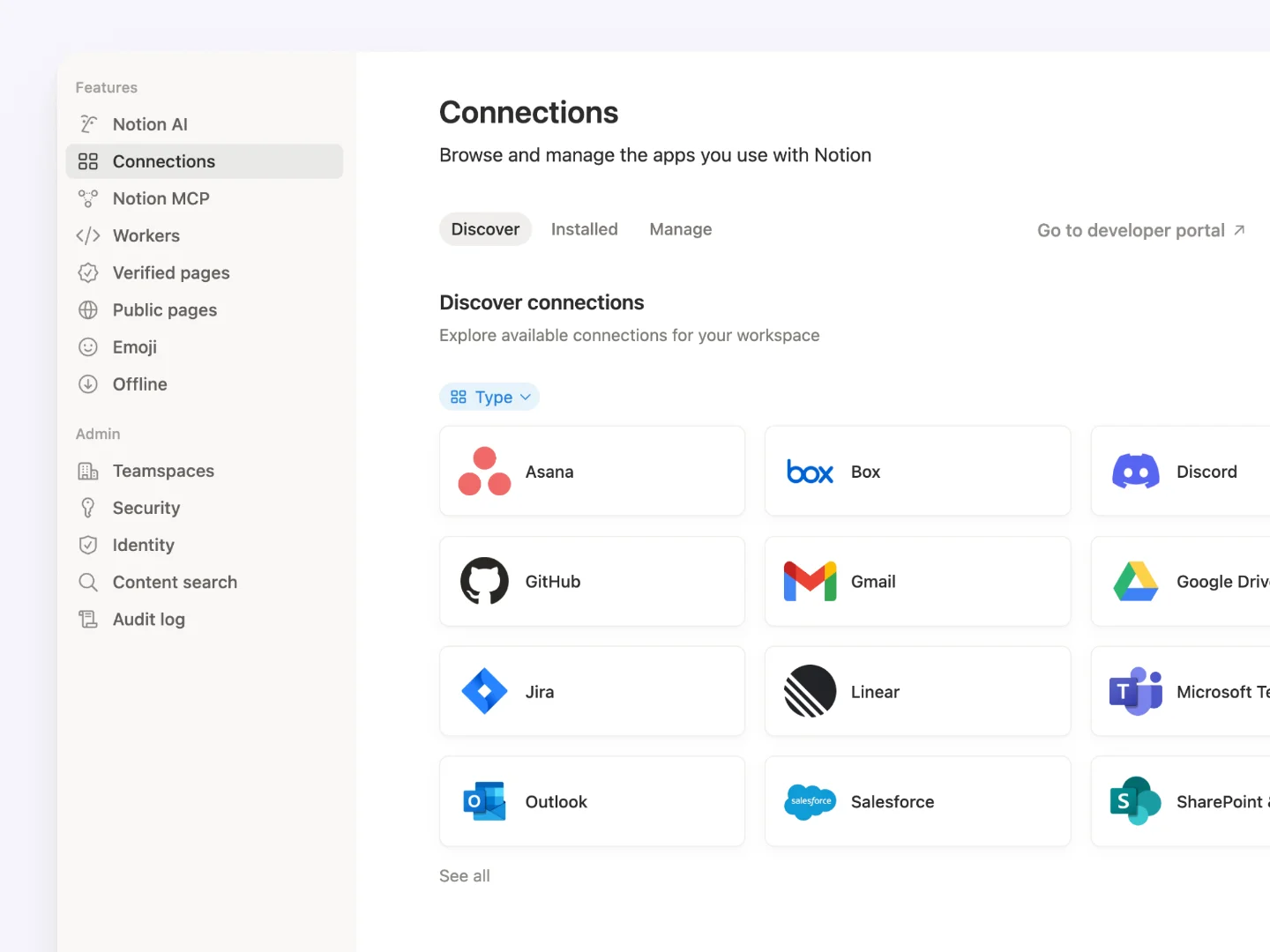
Notion's May 13, 2026 Developer Platform release 1 introduced five new primitives — External Agents API, Workers, CLI, bidirectional webhooks, updated REST API — but one of the most consequential UI changes shipped with none of that fanfare. The redesigned Connections tab in workspace settings quietly collapsed three previously separate surfaces — personal connections, workspace connections, and personal access tokens — into a single unified list. 1 External AI agents like Claude, Codex, and Cursor now appear in that same list, as rows alongside your Slack integration and your internal API token.
That's not a housekeeping change. It's an architecture decision about how trust in AI agents should be managed — and there's a reusable PM pattern buried inside it.
The card-row system and what it treats as equal
The Connections tab (navigated via Settings → Connections) uses a card-row layout: each connected app or agent occupies a single horizontal row showing its icon and name at left, connection type labels in the middle, and status indicators plus action buttons trailing right. 1 Every row is visually identical regardless of whether the connection is a third-party OAuth integration, an internal API token, or an external AI agent.
The prior UX fragmented this: personal connections lived in one tab, workspace connections in another, and API tokens were buried deeper in developer settings. The practical result was that admins managing a growing integration stack had no single view of what had access to the workspace. You had to check multiple surfaces and mentally merge them.
By consolidating into one list, Notion makes the complete access picture visible in a single scroll. Notion's release copy put it directly: "every connection lives in one place, so your team can see everything that's available at a glance." 1
Information hierarchy: what the visual weight does and doesn't communicate
The app icon and name carry the most visual weight on each row — this is the identity layer. Connection type (Public, Internal, Personal Access Token) is rendered at lower prominence, functioning more like a tag than a navigation category. Status and action buttons sit at the trailing edge of each row.
This weighting is a deliberate choice with a consequence: type becomes metadata, not structure. In the old fragmented UI, connection type organized the entire navigation hierarchy — you went to the Personal tab because you were looking for personal connections. In the new single-list view, type is something you filter by or scan for, but it no longer gates entry to the surface. The organizing principle shifts from "what kind of connection?" to "what entity has access?"
That shift matters specifically for AI agents. If agent connections lived in a separate "Agents" tab, teams would treat agent authorization as a distinct workflow — something the developer or admin handles in a separate context. By folding agents into the same row structure as integrations and tokens, Notion communicates that authorizing Claude Code is the same class of decision as authorizing Figma or Zapier: you pick what pages it can see, you add it, it appears in the list.
State design: what the surface shows and what it deliberately omits
The three connection types visible within the Connections tab correspond to three trust scopes. 1 Public connections use OAuth 2.0 with a page-level picker — the agent can only access pages the authorizing member explicitly shares. Internal connections are workspace-scoped with a static token. Personal Access Tokens are user-scoped bearer tokens for individual API access.
What the Connections tab makes immediately readable: which apps are connected, how they're authorized, and whether they're active. What it doesn't surface: when each connection last accessed anything, what specific pages or databases each agent has been given, or any audit trail of what agents have done. Those gaps are real. A workspace admin looking at this screen can answer "what has access?" but not "what has it been doing?" That second question — agent activity, not just agent authorization — is not answered here, and the absence is meaningful. As teams move from one or two external agents to a dozen, that activity layer will likely need to exist somewhere.
The permission model also changed with this release: any workspace member can now create connections, not just workspace owners. 1 That democratizes agent onboarding but creates a new governance surface — the Connections tab is now also the place where an admin would need to review and revoke connections that team members added independently.
The reusable pattern: the trust dashboard
The design decision Notion made here has a name: Trust Dashboard — a single, role-accessible surface that consolidates all authorization-bearing connections (human tools, AI agents, API tokens) in one scannable list, organized by entity identity rather than connection type.
A trust dashboard has three required properties per row:
- Identity: what is this, and who published or controls it?
- Scope: what data does it have access to, and at what granularity?
- Status: is it currently active, and is the authorization valid?
The anti-pattern it replaces is the "developer-only agent config buried in API settings" — where AI authorization lives in a tab only engineers open, creating an information asymmetry between the people who add agents and the people who are accountable for what those agents can see.
The test for whether your product needs a trust dashboard: can a non-technical team member — a PM, an ops lead, a CS manager — answer "what does this agent have access to?" in under 10 seconds from one screen? If not, the authorization surface is under-designed for the team's actual accountability structure.
Notion's Connections tab doesn't fully pass its own test yet — the missing activity layer means "what can it access?" is visible but "what has it done?" is not. But the consolidation move is the right architectural direction, and it's one worth applying to any product that's adding AI agents as first-class participants in a shared workspace.
Cover image: Notion Connections tab screenshot from the Notion Developer Platform release page (notion.com/releases/2026-05-13)*)
이 콘텐츠를 둘러싼 관점이나 맥락을 계속 보강해 보세요.